Microsoft Copilot Harness in Foundry Agent Service
This week we launched the Microsoft Copilot harness in public preview in Foundry Agent Service. You define the agent declaratively with instructions, tools, skills, and guardrails, and Microsoft manages the execution system that runs it.
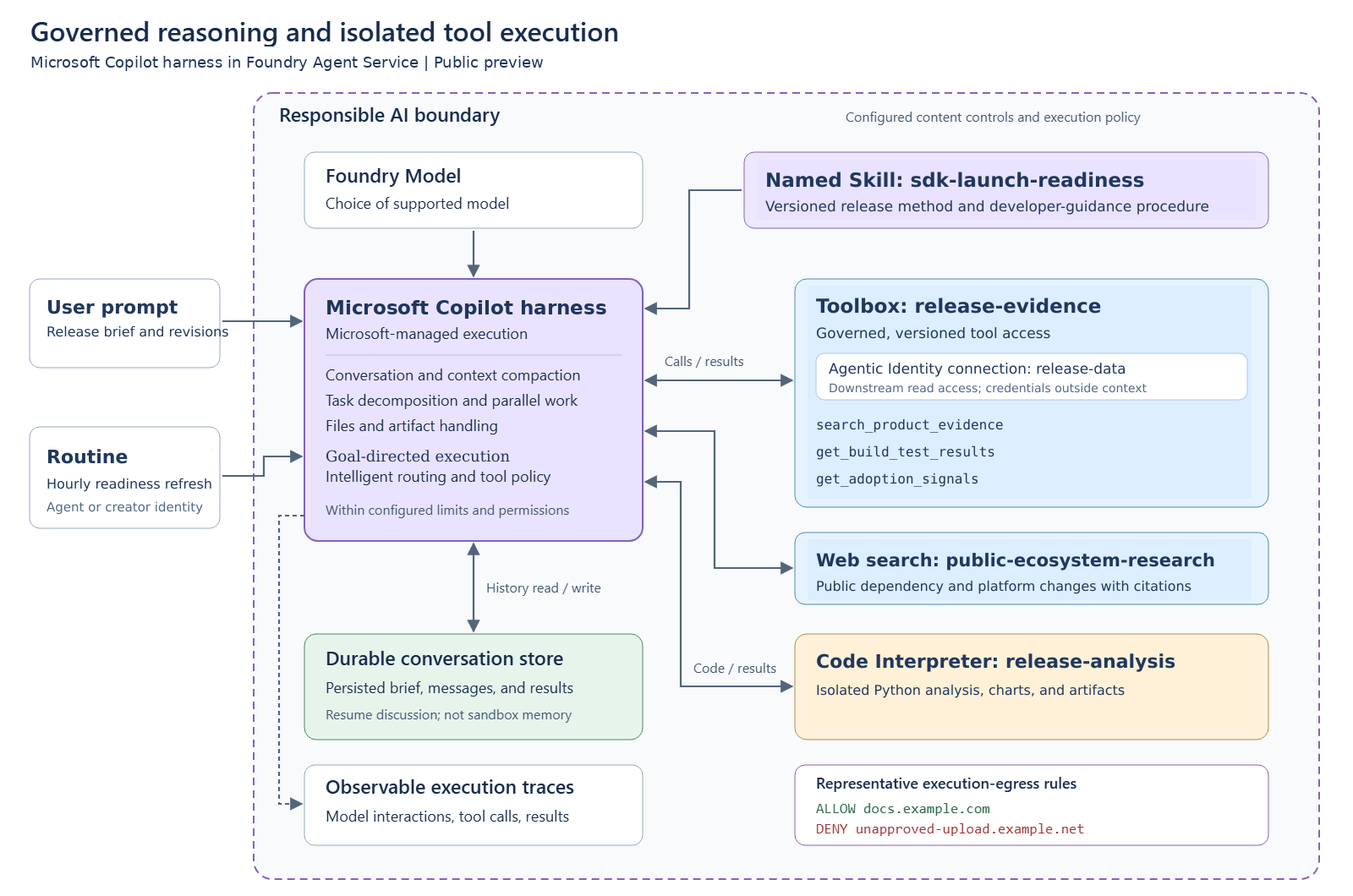
The harness is the same multi-model execution layer Microsoft has standardized on across its Copilot experiences, and Satya announced it at GitHub Universe as part of a broader push to redefine the software development lifecycle for the agentic era. Tina Schuchman and Vladimir Fedorov’s post explains why a shared harness matters: models change quickly, and every improvement to the harness now reaches agents built on Foundry too. Jeff Hollan and I wrote the launch post on the Foundry blog, which Satya also shared. Here I go deeper with a fuller example.
Working with customers, we kept seeing teams rebuild the same execution primitives: agent loops, tool integrations, conversation management, and execution controls. The applications were different, but the heavy lifting was the same. That machinery is the repeatable part, while a team’s knowledge, tools, and definition of success are what make an agent valuable. With the harness, we own the machinery so teams can focus on what differentiates their agents.
To make this concrete, imagine a developer platform team preparing a new SDK and API release. Their agent researches public ecosystem and dependency changes, reviews product specifications, build and test results, support issues, and adoption signals, and produces a launch-readiness brief covering compatibility risks, migration guidance, sample priorities, documentation gaps, and a validation plan, each backed by evidence. The flow is ecosystem research -> compatibility analysis -> developer guidance -> a reviewable launch recommendation. The engineering and product teams still own the release decision, and the agent never merges code, publishes packages or documentation, or changes the rollout.
Choosing How Much of the Agent Stack to Own
For the SDK/API launch-readiness agent, pick the layer that matches how much runtime control you need. A prompt agent without the Microsoft Copilot harness works when instructions and supported tools are enough for the job. The Microsoft Copilot harness fits when you want skills, managed execution, files, subagents, and more complex tool coordination without owning the harness yourself. Hosted agents in Foundry Agent Service make sense when you need to bring or change the framework, loop, middleware, dependencies, process model, or runtime policy. With hosted agents you bring your own code, framework, or SDK while keeping Foundry-managed hosting and ecosystem integrations, and long-running resilience, now generally available, helps them recover from interruptions during work that takes hours or days.
In this preview, you choose the harness when you create the agent. Existing agents are unchanged, and changing the harness after creation isn’t supported yet. The harness runs in Foundry with your model deployment, and Foundry manages the execution environment’s CPU, memory, and idle settings. Data sent to tools you configure remains subject to those tools’ data-handling terms. For the launch-readiness agent, you define the assessment method and access boundaries, and Microsoft manages the harness that carries out the work.
What Foundry Manages for Your Agent
A model generates the next decision. The harness drives the agent loop around it: selecting tools, handling results, maintaining working context, and continuing toward a deliverable.
Conversation and working context. The harness manages conversations and working context as interactions grow. The launch-readiness agent can move from ecosystem research to revised migration guidance without your application rebuilding its working history on every turn.
Model-agnostic orchestration and parallel work. You can choose a supported Foundry model without rewriting the orchestration. With subagents enabled, the harness can delegate bounded work, such as ecosystem research and build-result analysis, and combine the findings.
Versioned skills and intelligent tool routing. Versioned skills package reusable procedures, and intelligent routing helps select the right tool for each step. The launch-readiness skill guides the agent from public ecosystem research to internal release evidence and numerical analysis.
Files, artifacts, and durable conversation state. The agent can work with test, adoption, and support datasets and return charts alongside its readiness brief. Durable conversation state lets the team resume the discussion from recorded exchanges, which is separate from sandbox execution state. Save the artifacts you need according to their lifecycle, since conversation persistence doesn’t guarantee process recovery or indefinite Python memory.
Goal-directed execution within governed boundaries. The harness continues through model and tool steps without your application advancing every step. It keeps working until it determines the requested outcome has been met or it reaches a configured limit or policy boundary. Tool policy, permissions, and Responsible AI controls further bound that execution.
Observable execution. After you connect Application Insights to the Foundry project, traces expose model interactions, tool calls, and results. If the migration guidance contains an unsupported compatibility claim, you can inspect the evidence and execution path directly instead of guessing from the final brief.
Defining What Makes the Agent Yours
The harness supplies the execution machinery. You supply the expertise, evidence, and authority that make the agent useful for a specific job.
The method: instructions and skills. Instructions establish the objective, audience, and deliverable. The sdk-launch-readiness skill supplies the assessment method and developer-guidance criteria: connect each compatibility concern to supporting evidence, distinguish requirements from recommendations, and flag evidence gaps.
The evidence: research tools, web search, and Code Interpreter. The agent uses web search for public dependency, platform, and API changes, the release-evidence toolbox for internal specifications, build results, test results, support issues, and adoption signals, and Code Interpreter for metrics and charts. Connection credentials stay outside model context, but authorized results can still contain sensitive data. Keep confidential material out of web queries and review the grounding service’s data-handling terms.
The authority: identity and Responsible AI. Grant the Microsoft Entra Agent Identity assigned by Foundry read access to approved release evidence only, with no permission to merge code, publish packages, or change the rollout. Delegated connections must honor the user’s access. Configure supported Responsible AI controls for harmful content and prompt attacks. Guardrails address safety risks, and factual claims still need evaluation.
Building on the Foundry Ecosystem
The launch-readiness agent also needs a quality loop and a way for developers and release owners to use it. Building in Foundry connects that work to the same platform instead of creating another integration backlog.
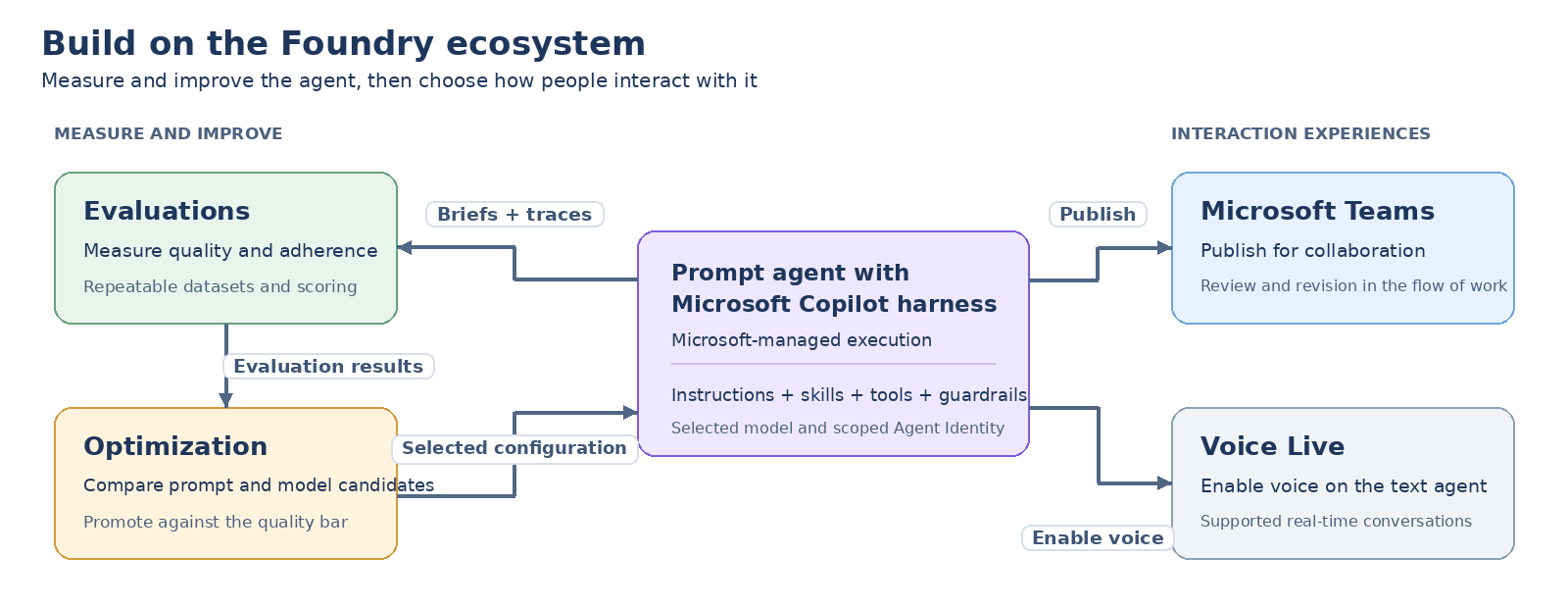
Evaluate and optimize. Evaluate readiness briefs that have missing evidence or conflicting compatibility conclusions, scoring technical accuracy, migration coverage, sample completeness, and the usefulness of the validation plan. If a qualification disappears between the analysis and the migration guidance, Foundry’s optimization loop can test configuration changes against the same release cases. Use the same evaluation cases before and after a change so an apparent improvement doesn’t simply come from a different test.
Bring review into Teams and voice. Publish to Microsoft Teams for requests such as, “Show the evidence for compatibility risk two and revise the migration guidance for Python developers.” Enable Voice Live on the text agent to discuss launch risks aloud in a supported voice experience. Neither channel expands the agent’s permissions.
Govern the research toolkit centrally. Toolboxes let the team reuse approved release-evidence and analytics tools through a versioned endpoint, with connection authentication and supported tool-boundary controls managed centrally. Adding a build system, issue source, or adoption dataset becomes a toolbox update instead of another token-handling implementation in each launch-readiness agent.
Prepare the next review with a Routine. A Routine can refresh public ecosystem changes and recent build, test, support, and adoption evidence before the release-readiness review. Provide an approved baseline if the analysis should identify changes, select the appropriate dispatch identity, and inspect the run history. Scheduling the assessment doesn’t automatically publish a package, update documentation, or change the rollout.
Building the Launch-Readiness Agent Declaratively
This Azure Developer CLI (azd) example uses the preview declarative surface. It assumes a Foundry project, a supported model deployment, an authenticated read-only research toolbox, and a tested RAI policy, and it doesn’t provision those prerequisites. The azd workflow is one authoring option. In Foundry Toolkit for Visual Studio Code, you can use Agent Builder to configure, test, and save prompt agents, and the Microsoft Foundry Skill provides a conversational path to creating and managing them.
First, put the team’s procedure in skills/sdk-launch-readiness/SKILL.md:
| |
Then define the skill and agent in azure.yaml, using the skill name in the agent’s configuration and instructions:
| |
Set the referenced values in your active azd environment and provide release criteria and API guidance through approved sources. The toolbox’s downstream connections use agentic-identity with scoped read access, and access to the toolbox itself is a separate boundary. For this MCP server, require_approval: never skips interactive approval for tool calls but still enforces authorization. Generated Python runs through Code Interpreter, which keeps reasoning and code execution separate. Reference your existing RAI policy by its full ARM resource ID and configure execution-egress targets for your environment.
With the required Foundry extension and authentication configured, deploy and invoke from the project directory:
| |
That is the whole application boundary. You provide a skill, tool references, and controls, and the harness owns the loop and the container.
To refresh launch readiness on a schedule, add a Routine under services in the same azure.yaml:
| |
Redeploy to create the Routine, with source access granted to its configured dispatch identity. This illustrative cron expression runs at the start of every hour in the configured time zone. Each run can invoke the model and tools and incur usage charges, so choose a production frequency that matches the release cadence, and inspect the responses through run history.
Start with one release candidate, a narrow evidence toolkit, and an evaluation set that reflects your team’s quality bar. Expand access and automation only after the readiness brief is something a release lead can inspect and use. Asking an agent whether the SDK is ready is the easy part. The real value comes from giving it the tools and expertise to show what is ready, what isn’t, and what evidence supports that conclusion.
Getting Started
You can start in the Microsoft Foundry portal or use azd to keep the agent definition alongside the rest of your application. The Microsoft Copilot harness how-to, the web research quickstart, and the supported regions, models, tools, and preview limits are the best places to begin.
Billing for the Microsoft Copilot harness begins December 1, 2026, with consumption-based pricing. Harness runtime usage is free until then, while model inference and separately billed tools and connected services keep their normal charges. Starting December 1, sandbox compute and memory are billed at USD $0.0994 per vCPU-hour and $0.0118 per GiB-hour, and prices may vary by region and agreement. See Foundry Agent Service pricing for current details. Since this is a public preview, capabilities, APIs, regions, limits, and pricing may change before general availability.
References
- Introducing the Microsoft Copilot harness in Foundry Agent Service - Microsoft Foundry Blog
- Introducing the Microsoft Copilot harness: Unlocking the potential of truly multi-model agentic work - Official Microsoft Blog
- Redefining the SDLC for the agentic era - Satya Nadella on LinkedIn
- Satya’s share of the Foundry launch post - LinkedIn
- Use the Microsoft Copilot harness - Microsoft Learn
- Create a web research agent - Microsoft Learn
- Hosted agents in Foundry Agent Service - Microsoft Learn
- Long-running resilience for hosted agents - Microsoft Learn
- Building agents that act on your behalf with toolboxes in Foundry - Microsoft Foundry Blog
- Routines in Microsoft Foundry are now generally available - Microsoft Foundry Blog
- The agent optimization loop and how we built it in Foundry - Command Line
- Foundry Agent Service pricing - Microsoft Azure